
Show editor
Multi-track timeline, compositions in tabs, drag media onto faces, revisions and MP4 renders.
Read more →Fit a box to your house from a photo or live through the projector, trace walls, roofs, windows and doors on top, then light each face on the real house to check it.
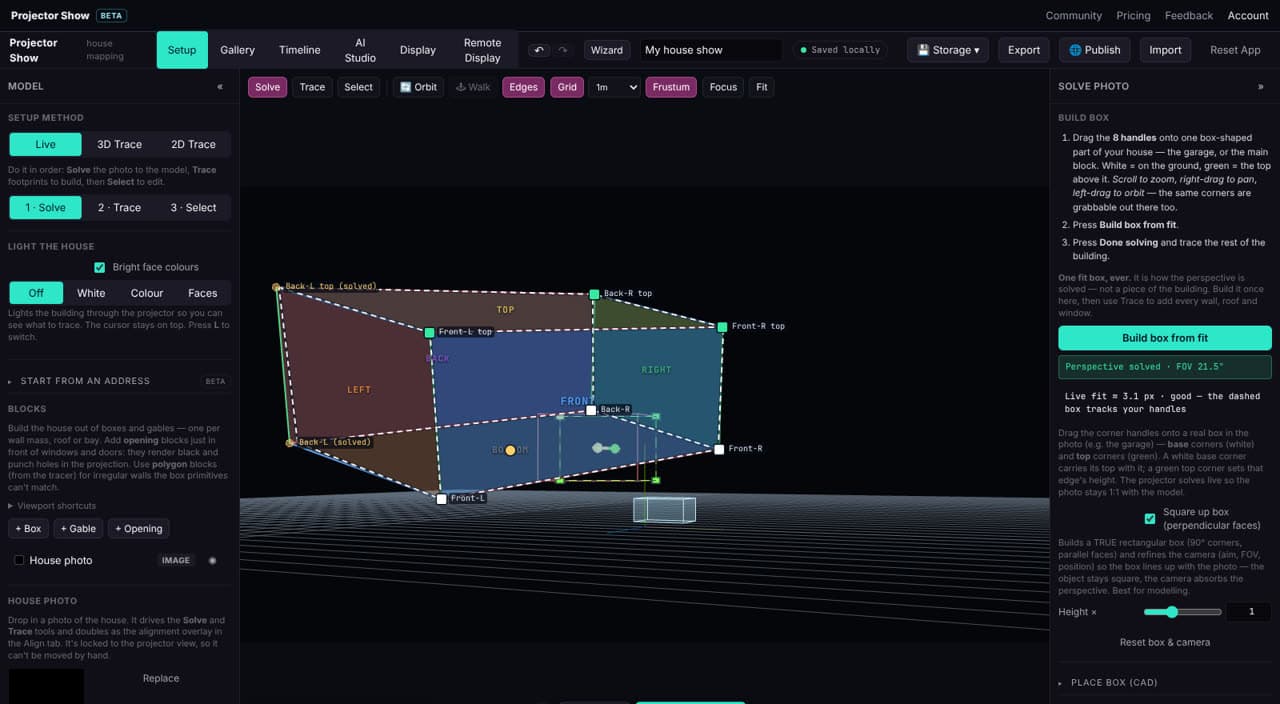
Drag the eight corners of a fit box onto one box-shaped part of the house and Projector Show works out where the projector is and how wide its lens is. Then trace every wall, roof and opening on top.
Light the house white, in one colour, or with a different colour on every face, straight through the projector, so you can see which face is which and fix any that miss.
Rough sizes help effects look right, but the fit box solves the projector’s position and lens from what you line up. You can set the real height of the house afterwards.
Multi-track timeline, compositions in tabs, drag media onto faces, revisions and MP4 renders.
Read more →Garage doors roll up, windows shatter, shutters swing and doors burst open, with lit rooms behind them.
Read more →Install on a mini PC, pair it, and it plays your playlists on a schedule, cuts the HDMI signal between shows so projectors that sleep on no signal can rest, and takes a live feed.
Read more →The designer runs in your browser, with nothing to install. Your first show is free.